Ollama 全面指南
Salted Fish 2025/12/4 自然语言
# 一、Ollama 整体介绍
# 1.1 什么是 Ollama?
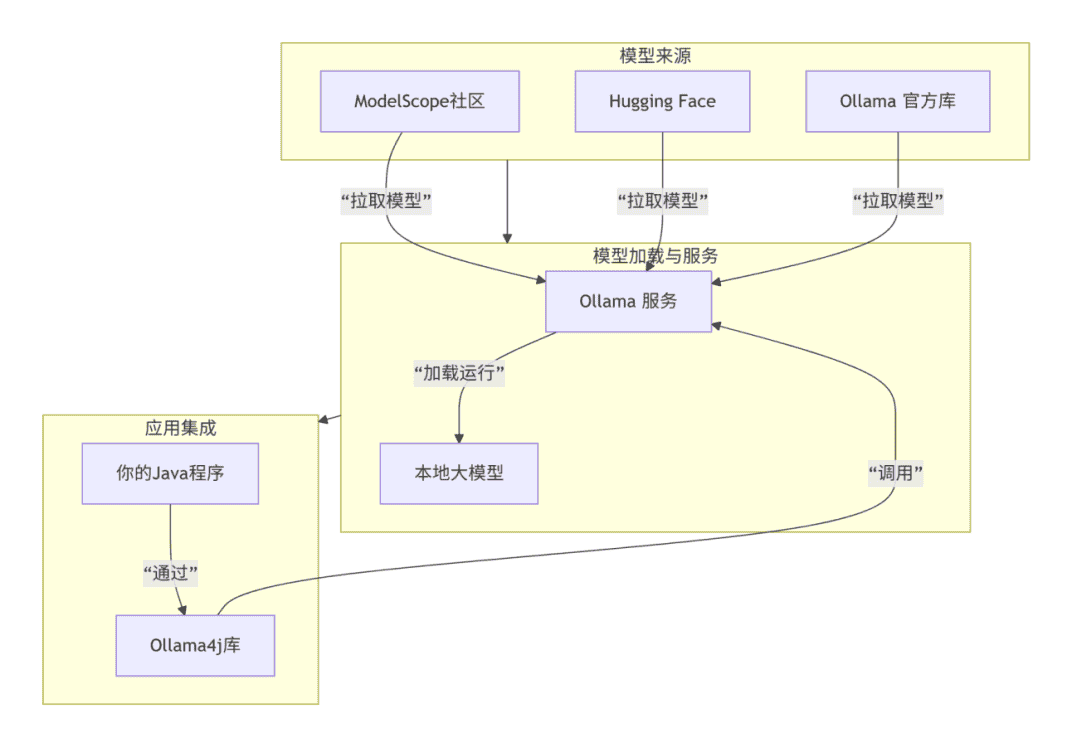
Ollama 是一个开源的大语言模型本地部署和运行框架,它让开发者能够在自己的计算机或服务器上轻松运行各种开源大模型。
您可以把 Ollama 想象成一个极其强大和方便的 “游戏启动器”(比如 Steam),而开源大模型就是一个个具体的 “游戏”(比如《赛博朋克2077》、《艾尔登法环》)。
Ollama(游戏启动器):它本身不包含任何游戏内容,但它负责管理、安装、更新和为游戏提供运行环境。你打开启动器,选择你想玩的游戏,它就能帮你配置好一切并运行起来。
开源模型(游戏):这就是具体的“内容”和“能力”本身。Llama 3、DeepSeek、Qwen 这些就是不同的“游戏”,它们各有各的剧情、画面和玩法(即:不同的知识结构、能力侧重和对话风格)。
Modelscope 社区:https://www.modelscope.cn (opens new window) - 聚焦中文模型,有丰富的技术文章和模型评测,可以帮助您深入了解不同模型在中文任务上的表现。
# 1.2 核心特性
- 简化部署:一键安装,命令行操作极其简单
- 模型丰富:支持 Llama、Mistral、Qwen、DeepSeek 等主流开源模型
- 跨平台:支持 Windows、macOS、Linux
- API 驱动:提供标准的 RESTful API 接口
- 资源友好:通过量化技术降低硬件要求
# 1.3 技术架构
# 二、Ollama 的应用方向
# 2.1 个人与学习用途
- AI 学习实验:低成本体验不同大模型
- 个人助手:文档总结、代码辅助、内容创作
- 原型验证:快速验证 AI 应用想法
# 2.2 企业级应用
- 数据敏感场景:金融、医疗、法律等隐私要求高的领域
- 成本敏感项目:避免云服务按调用次数计费
- 定制化需求:需要针对特定领域微调模型
# 2.3 开发测试
- 本地开发环境:开发阶段的 AI 功能测试
- CI/CD 集成:自动化测试中的 AI 能力验证
# 三、Ollama部署安装
# 3.1 Ollama 传统安装
# Windows 系统
# 1. 直接从官网下载安装包
# https://ollama.ai/download
# 运行 OllamaSetup.exe
# 2. 安装后启动服务
ollama serve
# 服务默认运行在 http://localhost:11434
# 3. 下载模型:你需要拉取生成模型和嵌入模型。
# 生成模型负责对话:
ollama pull llama3.1:8b
# 嵌入模型负责文本转向量
ollama pull nomic-embed-text:latest


# Linux 系统
# 1. 使用安装脚本
curl -fsSL https://ollama.ai/install.sh | sh
# 2. 下载模型:你需要拉取生成模型和嵌入模型。
# 模型选择:qwen:7b - 中英文支持好,响应速度快
#		  deepseek-coder:6.7b - 对技术文档理解更强
#		  llama3.2:3b - 资源消耗低,响应迅速
# 生成模型负责对话:
ollama pull llama3.1:8b
# 嵌入模型负责文本转向量
ollama pull nomic-embed-text:latest
# 4.验证
ollama list # 确认模型已下载
ollama serve # 启动服务,默认端口为 11434
1
2
3
4
5
6
7
8
9
10
11
12
13
14
15
16
17
18
19
20
21
22
23
24
25
26
27
28
2
3
4
5
6
7
8
9
10
11
12
13
14
15
16
17
18
19
20
21
22
23
24
25
26
27
28
# 3.2 Ollama 手动安装
# 1. 下载Ollama可执行文件
# 下载地址
https://ollama.com/download/ollama-linux-amd64
# 或者
https://pan.baidu.com/s/1PoPx2Q2RKM-nsedthB4oZQ?pwd=dijf
# 解压安装包
tar -xzf ollama-linux-amd64.tgz
# 解压后会出现两个目录 bin/ lib/,都移动到手动创建的ollama中方便管理
mv bin/ lib/ ollama/
# 重命名为 ollama,这样后续命令会更简洁
mv ollama-linux-amd64 ollama
# 赋予执行权限
chmod +x ollama
1
2
3
4
5
6
7
8
9
10
11
12
2
3
4
5
6
7
8
9
10
11
12
# 2. 配置环境与启动服务
# 1.配置环境变量
vim ~/.bashrc
# 修改或添加以下行
export PATH="$HOME/ollama/bin:$PATH"
export LD_LIBRARY_PATH="$HOME/ollama/lib:$LD_LIBRARY_PATH"
# 自定义模型存储路径(通过设置 OLLAMA_MODELS 环境变量)
export OLLAMA_MODELS=/home/ollama/ollama/model
# 自定义外部访问
export OLLAMA_HOST=0.0.0.0:11434
# 重启配置
source ~/.bashrc
# 显示版本号表示安装成功(ollama version is 0.13.0)
ollama --version

# 2.启动Ollama服务 服务默认会启动在 http://127.0.0.1:11434。注意: 此终端窗口在服务运行期间需要保持打开状态。
# 在前台启动服务(会占用当前终端)
ollama serve
# 或者使用 nohup 在后台启动
nohup ollama serve > ~/ollama.log 2>&1 &
# 服务验证 ("status": "ok",表示服务运行正常)
curl http://localhost:11434/api/tags
# 查询端口监听
netstat -tulpn | grep 11434
1
2
3
4
5
6
7
8
9
10
11
12
13
14
15
16
17
18
19
20
21
22
23
2
3
4
5
6
7
8
9
10
11
12
13
14
15
16
17
18
19
20
21
22
23
# 3. 拉取并运行模型
# 拉取模型
ollama pull llama3.2:1b
# 运行模型
ollama run llama3.2:1b
1
2
3
4
2
3
4
# 4. 实用命令
| 命令 | 功能 |
|---|---|
ollama list | 列出本地已下载的所有模型 |
ollama pull <模型名> | 下载模型但不立即运行 |
ollama run <模型名> | 运行一个模型并开始对话 |
ollama rm <模型名> | 删除本地的一个模型 |
ollama --version | 查看当前 Ollama 版本 |
ollama help | 获取命令帮助信息 |
# 3.3 系统自启动设置
# 1. 创建服务文件
sudo vim /etc/systemd/system/ollama.service
1
# 2. 写入服务配置
[Unit]
Description=Ollama Service (Simplified)
After=network-online.target
Wants=network-online.target

[Service]
Type=simple
User=ollama
Group=ollama
WorkingDirectory=/home/ollama/ollama
Environment="PATH=/home/ollama/ollama/bin:/usr/local/sbin:/usr/local/bin:/usr/sbin:/usr/bin:/sbin:/bin"
Environment="LD_LIBRARY_PATH=/home/ollama/ollama/lib"

# 修改模型存储路径
Environment="OLLAMA_MODELS=/home/ollama/ollama/models"
# 允许外部访问
Environment="OLLAMA_HOST=0.0.0.0:11434"
# 设置 GPU 数量
#Environment="OLLAMA_NUM_GPUS=1"

ExecStart=/home/ollama/ollama/bin/ollama serve
Restart=always
RestartSec=3
PrivateTmp=yes
NoNewPrivileges=yes
ReadWritePaths=/home/ollama/ollama

[Install]
WantedBy=multi-user.target
1
2
3
4
5
6
7
8
9
10
11
12
13
14
15
16
17
18
19
20
21
22
23
24
25
26
27
28
29
2
3
4
5
6
7
8
9
10
11
12
13
14
15
16
17
18
19
20
21
22
23
24
25
26
27
28
29
注意:如果需要将生成的.ollama目录放置在/home/ollama/ollama目录下
创建目录:mkdir -p /home/ollama/ollama/.ollama
创建符号链接:ln -s /home/ollama/ollama/.ollama /home/ollama/.ollama
目录结构:
/home/ollama/
├── .ollama -> /home/ollama/ollama/.ollama/ (符号链接)
├── ollama/
│   ├── bin/
│   ├── lib/
│   ├── models/ (模型文件)
│   └── .ollama/ (配置和数据文件)
└── ...其他文件...
1
2
3
4
5
6
7
8
# 3. 重新加载 systemd 配置
systemctl daemon-reload
1
# 4. 启用并启动服务
# 启用开机自启动
sudo systemctl enable ollama
# 立即启动服务(注意:如果启动不成功,可能是目录不存在,可以先创建目录)
sudo systemctl start ollama
# 检查服务状态
sudo systemctl status ollama
1
2
3
4
5
6
2
3
4
5
6
# 5.查看服务日志
# 查看实时日志
journalctl -u ollama -f
# 查看最近日志
journalctl -u ollama --no-pager -n 20
1
2
3
4
2
3
4
# 6.常用管理命令
| 命令 | 功能 |
|---|---|
sudo systemctl start ollama | 启动服务 |
sudo systemctl stop ollama | 停止服务 |
sudo systemctl restart ollama | 重启服务 |
sudo systemctl status ollama | 查看状态 |
sudo systemctl enable ollama | 启用自启动 |
sudo systemctl disable ollama | 禁用自启动 |
sudo journalctl -u ollama -f | 查看实时日志 |
# 四、Ollama 与 Ollama4j 的结合使用
# 4.1 Ollama4j 简介
Ollama4j 是 Ollama 的 Java 客户端库,让 Java 应用能够方便地调用 Ollama 服务。
# 4.2 基础集成示例
在你的 Maven pom.xml 中添加依赖:
<!-- 用于与 Ollama 交互 -->
<dependency>
    <groupId>io.github.ollama4j</groupId>
    <artifactId>ollama4j</artifactId>
    <version>0.3.0</version>
</dependency>
<!-- 用于与 Elasticsearch 交互(知识库的搭建需要) -->
<dependency>
    <groupId>co.elastic.clients</groupId>
    <artifactId>elasticsearch-java</artifactId>
    <version>8.13.0</version>
</dependency>
1
2
3
4
5
6
7
8
9
10
11
12
2
3
4
5
6
7
8
9
10
11
12
代码示例:
// 基础使用
public class BasicOllamaExample {
    public static void main(String[] args) {
        OllamaAPI ollama = new OllamaAPI("http://localhost:11434");

        GenerateRequest request = GenerateRequest.builder()
            .model("qwen:7b")
            .prompt("请用Java写一个Hello World程序")
            .stream(false)
            .build();

        GenerateResponse response = ollama.generate(request);
        System.out.println(response.getResponse());
    }
}
1
2
3
4
5
6
7
8
9
10
11
12
13
14
15
2
3
4
5
6
7
8
9
10
11
12
13
14
15
# 4.3 高级功能使用
// 流式响应
public void streamExample() {
    OllamaAPI ollama = new OllamaAPI("http://localhost:11434");

    GenerateRequest request = GenerateRequest.builder()
        .model("llama3.2:3b")
        .prompt("解释人工智能的概念")
        .stream(true)
        .build();

    ollama.generate(request, new GenerateResponseListener() {
        @Override
        public void onResponse(GenerateResponse response) {
            System.out.print(response.getResponse());
        }

        @Override
        public void onComplete(GenerateResponse completeResponse) {
            System.out.println("\n--- 生成完成 ---");
        }

        @Override
        public void onError(Throwable throwable) {
            System.err.println("错误: " + throwable.getMessage());
        }
    });
}
1
2
3
4
5
6
7
8
9
10
11
12
13
14
15
16
17
18
19
20
21
22
23
24
25
26
27
2
3
4
5
6
7
8
9
10
11
12
13
14
15
16
17
18
19
20
21
22
23
24
25
26
27
# 五、Ollama 在实际开发中的地位
# 5.1 技术选型考量
| 场景 | 推荐方案 | 理由 |
|---|---|---|
| 个人项目/原型 | ✅ Ollama | 快速启动,成本低 |
| 中小型企业应用 | ✅ Ollama | 数据安全,总成本可控 |
| 高并发生产环境 | ⚠️ vLLM + 云GPU | 性能要求高 |
| 资源受限设备 | ✅ Ollama + 小模型 | 硬件兼容性好 |
# 5.2 相同类型之间的对比
| 工具 | 核心定位 | 核心技术/特点 | 典型适用场景 |
|---|---|---|---|
| Ollama | 个人本地开发利器 | 基于GGUF模型格式,集成llama.cpp推理引擎,命令行操作极简 | 本地开发调试、快速原型验证、数据敏感应用 |
| LM Studio | 图形化桌面应用 | 提供图形化界面(GUI),内置模型市场,OpenAI兼容的API | 不熟悉命令行的个人学习者或需要图形界面的开发者 |
| llama.cpp | 极致轻量级引擎 | C++高性能实现,通过指令集优化CPU推理,硬件要求极低 | 树莓派、老旧PC等资源受限设备 |
| vLLM | 企业级服务引擎 | PagedAttention和Continuous Batching技术,追求高吞吐、低延迟 | 大规模、高并发的生产环境API服务 |
# 5.3 实际应用场景举例
- 智能客服助手:处理常见问题咨询
- 文档分析与摘要:自动处理项目文档、报告
- 数据清洗与标注:辅助处理业务数据
- 代码助手:内部开发的编程辅助工具
- 安全要求:所有数据在内部网络处理,适合处理敏感业务数据、用户隐私信息等场景
# 六、智能问答实战开发
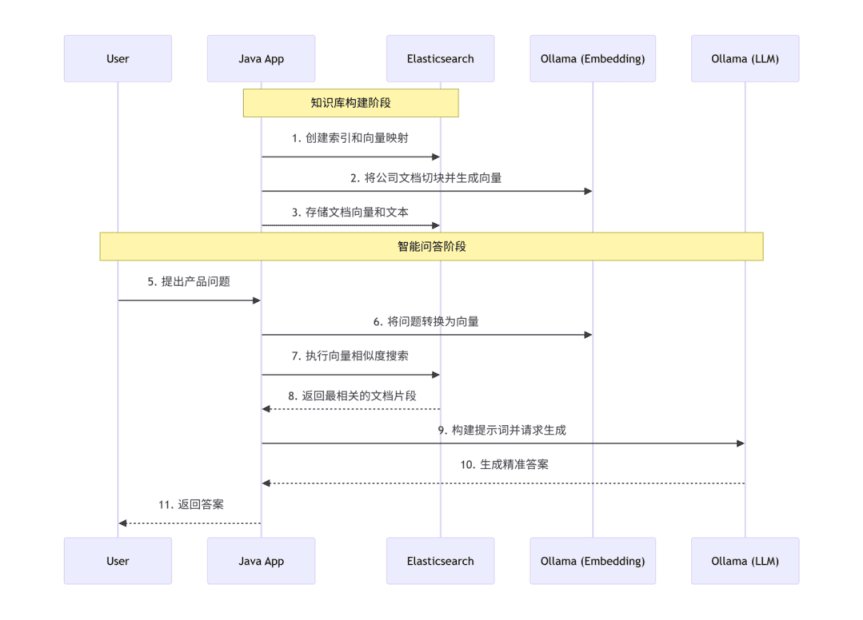
# 6.1 整体架构设计
# 6.2 核心服务实现
# 6.2.1 Elasticsearch索引创建
@Service
public class CreateKnowledgeIndex implements BeanInitialize {

    private static final Logger logger = LoggerFactory.getLogger(CreateKnowledgeIndex.class);

    @Autowired
    private ElasticsearchClient elasticsearchClient;

    @Override
    public void initialize() {
        try {
            // 先检查索引是否存在
            boolean exists = elasticsearchClient.indices().exists(e -> e.index("company-knowledge")).value();

            if (!exists) {
                // 直接测试分析器,不指定索引
                try {
                    AnalyzeRequest analyzeRequest = new AnalyzeRequest.Builder()
                            .analyzer("ik_max_word")
                            .text("测试分词")
                            .build();

                    elasticsearchClient.indices().analyze(analyzeRequest);
                    logger.info("IK 分词器可用,使用 ik_max_word 分析器");

                    // 创建索引时使用 IK 分词器(这个要手动安装!!!)
                    createIndexWithIK();

                } catch (Exception e) {
                    logger.warn("IK 分词器不可用,使用标准分析器: {}", e.getMessage());
                }
            } else {
                logger.info("问答知识库索引已存在,无需创建");
            }
        } catch (IOException e) {
            logger.error("创建知识库索引失败: {}", e.getMessage(), e);
        }
    }

    /**
     * 使用 IK 分词器创建索引
     */
    private void createIndexWithIK() throws IOException {
        CreateIndexRequest createIndexRequest = new CreateIndexRequest.Builder()
                .index("company-knowledge")
                .mappings(m -> m
                        .properties("id", p -> p.keyword(k -> k))
                        .properties("content", p -> p.text(t -> t.analyzer("ik_max_word")))
                        .properties("content_vector", p -> p.denseVector(d -> d
                                .dims(768)
                                .index(true)
                                .similarity("cosine")))
                        .properties("source", p -> p.keyword(k -> k))
                        .properties("category", p -> p.keyword(k -> k))
                        .properties("timestamp", p -> p.date(d -> d))
                )
                .settings(s -> s
                        .numberOfShards("1")
                        .numberOfReplicas("0")
                )
                .build();

        elasticsearchClient.indices().create(createIndexRequest);
        logger.info("问答知识库索引创建成功(使用 IK 分词器)");
    }
}
1
2
3
4
5
6
7
8
9
10
11
12
13
14
15
16
17
18
19
20
21
22
23
24
25
26
27
28
29
30
31
32
33
34
35
36
37
38
39
40
41
42
43
44
45
46
47
48
49
50
51
52
53
54
55
56
57
58
59
60
61
62
63
64
65
66
2
3
4
5
6
7
8
9
10
11
12
13
14
15
16
17
18
19
20
21
22
23
24
25
26
27
28
29
30
31
32
33
34
35
36
37
38
39
40
41
42
43
44
45
46
47
48
49
50
51
52
53
54
55
56
57
58
59
60
61
62
63
64
65
66
# 6.2.2 知识库服务 (Elasticsearch 实现)
@Service
public class KnowledgeBaseServiceImpl implements KnowledgeBaseService {

    private static final Logger logger = LoggerFactory.getLogger(KnowledgeBaseServiceImpl.class);

    private final ElasticsearchClient elasticsearchClient;
    private final OllamaService ollamaService;

    @Value("${knowledge.elasticsearch.index:company-knowledge}")
    private String indexName;

    @Value("${knowledge.chunk.max-size:500}")
    private int maxChunkSize;

    @Value("${knowledge.chunk.overlap:50}")
    private int chunkOverlap;

    @Value("${knowledge.search.min-score:0.7}")
    private double minScore;

    @Value("${knowledge.search.max-candidates:100}")
    private int maxCandidates;

    @Autowired
    public KnowledgeBaseServiceImpl(ElasticsearchClient elasticsearchClient,
                                    OllamaService ollamaService) {
        this.elasticsearchClient = elasticsearchClient;
        this.ollamaService = ollamaService;
    }

    /**
     * 添加文档到知识库
     */
    @Override
    public void addDocumentToKnowledgeBase(Document document) {
        // 添加连接状态检查
        try {
            elasticsearchClient.ping();
        } catch (Exception e) {
            logger.error("Elasticsearch连接检查失败", e);
            throw new RuntimeException("Elasticsearch服务不可用", e);
        }

        if (document == null || document.getContent() == null || document.getContent().trim().isEmpty()) {
            logger.warn("添加文档失败:文档内容为空");
            return;
        }

        long startTime = System.currentTimeMillis();
        AtomicInteger successCount = new AtomicInteger(0);

        try {
            // 1. 文档切分
            List<TextChunk> chunks = splitDocument(document);
            logger.debug("文档 '{}' 切分为 {} 个块", document.getSource(), chunks.size());

            // 2. 为每个文本块生成向量并存储
            for (int i = 0; i < chunks.size(); i++) {
                TextChunk chunk = chunks.get(i);
                try {
                    // 生成向量嵌入
                    float[] vector = ollamaService.generateEmbedding(chunk.getContent());

                    // 转换为List<Float>
                    List<Float> vectorList = new ArrayList<>();
                    for (float v : vector) {
                        vectorList.add(v);
                    }
                    // 构建知识条目
                    KnowledgeItem item = new KnowledgeItem();
                    item.setId(generateKnowledgeId(document.getSource(), i));
                    item.setContent(chunk.getContent());
                    item.setContentVector(vectorList);
                    item.setSource(document.getSource());
                    item.setCategory(document.getCategory());
                    item.setTimestamp(new Date());

                    // 存储到 Elasticsearch
                    IndexRequest<KnowledgeItem> request = new IndexRequest.Builder<KnowledgeItem>()
                            .index(indexName)
                            .id(item.getId())
                            .document(item)
                            .build();

                    elasticsearchClient.index(request);
                    successCount.incrementAndGet();

                    if ((i + 1) % 5 == 0) {
                        logger.debug("已处理 {}/{} 个文本块", i + 1, chunks.size());
                    }

                } catch (Exception e) {
                    logger.error("处理文本块 {}/{} 失败: {}", i + 1, chunks.size(), chunk.getSource(), e);
                    // 继续处理其他块
                }
            }

            long totalTime = System.currentTimeMillis() - startTime;
            logger.info("成功添加文档到知识库: {}, 切分块数: {}, 成功存储: {}/{}, 耗时: {}ms",
                    document.getSource(), chunks.size(), successCount.get(), chunks.size(), totalTime);

        } catch (Exception e) {
            logger.error("添加文档到知识库失败: {}", document.getSource(), e);
            throw new RuntimeException("知识库更新失败: " + e.getMessage(), e);
        }
    }

    /**
     * 搜索相关知识
     */
    @Override
    public List<KnowledgeItem> searchRelevantKnowledge(String query, int maxResults) {
        if (query == null || query.trim().isEmpty()) {
            logger.warn("搜索知识库失败:查询内容为空");
            return Collections.emptyList();
        }

        long startTime = System.currentTimeMillis();

        try {
            // 检查索引是否为空
            CountRequest countRequest = new CountRequest.Builder()
                    .index(indexName)
                    .build();

            long docCount = elasticsearchClient.count(countRequest).count();
            if (docCount == 0) {
                logger.debug("知识库为空,返回空结果");
                return Collections.emptyList();
            }

            float[] queryVector = ollamaService.generateEmbedding(query.trim());
            List<Float> queryVectorList = new ArrayList<>();
            for (float value : queryVector) {
                queryVectorList.add(value);
            }

            SearchRequest searchRequest = new SearchRequest.Builder()
                    .index(indexName)
                    .knn(k -> k
                            .field("content_vector")
                            .queryVector(queryVectorList)
                            .k(Math.min(maxResults * 2, 50))
                            .numCandidates(Math.min(maxCandidates, 50)) // 降低 numCandidates 值
                    )
                    .source(s -> s.filter(f -> f.excludes("content_vector")))
                    .build();

            SearchResponse<KnowledgeItem> response = elasticsearchClient.search(
                    searchRequest, KnowledgeItem.class
            );

            List<KnowledgeItem> results = response.hits().hits().stream()
                    .filter(hit -> hit.score() != null && hit.score() >= minScore)
                    .limit(maxResults)
                    .map(hit -> hit.source())
                    .filter(Objects::nonNull)
                    .collect(Collectors.toList());

            long searchTime = System.currentTimeMillis() - startTime;
            logger.debug("知识库搜索完成: '{}', 找到 {} 条结果,耗时: {}ms",
                    query, results.size(), searchTime);

            return results;

        } catch (Exception e) {
            logger.error("知识库搜索失败: '{}'", query, e);
            if (e.getCause() != null) {
                logger.error("根本原因: ", e.getCause());
            }
            // 返回空列表而不是抛出异常
            return Collections.emptyList();
        }
    }

    /**
     * 文档切分
     */
    private List<TextChunk> splitDocument(Document document) {
        List<TextChunk> chunks = new ArrayList<>();
        String content = document.getContent().trim();

        if (content.length() <= maxChunkSize) {
            // 如果内容很短,直接作为一个块
            TextChunk textChunk = new TextChunk();
            textChunk.setContent(content);
            textChunk.setSource(document.getSource());
            chunks.add(textChunk);
            return chunks;
        }

        // 按句子切分,然后合并成合适长度的块
        String[] sentences = content.split("[。!?!?\\n]");
        List<String> sentenceList = new ArrayList<>();

        // 过滤空句子
        for (String sentence : sentences) {
            String trimmed = sentence.trim();
            if (!trimmed.isEmpty()) {
                sentenceList.add(trimmed);
            }
        }

        List<String> chunksContent = new ArrayList<>();
        StringBuilder currentChunk = new StringBuilder();

        for (int i = 0; i < sentenceList.size(); i++) {
            String sentence = sentenceList.get(i);

            if (currentChunk.length() + sentence.length() > maxChunkSize && currentChunk.length() > 0) {
                // 保存当前块
                chunksContent.add(currentChunk.toString());
                currentChunk = new StringBuilder();

                // 添加重叠部分(如果可能)
                if (chunkOverlap > 0 && !chunksContent.isEmpty()) {
                    String lastChunk = chunksContent.get(chunksContent.size() - 1);
                    int overlapLength = Math.min(chunkOverlap, lastChunk.length());
                    String overlapText = lastChunk.substring(lastChunk.length() - overlapLength);
                    currentChunk.append(overlapText);
                }
            }

            if (currentChunk.length() > 0) {
                currentChunk.append("。");
            }
            currentChunk.append(sentence);
        }

        // 添加最后一个块
        if (currentChunk.length() > 0) {
            chunksContent.add(currentChunk.toString());
        }

        // 创建TextChunk对象
        for (String chunkContent : chunksContent) {
            TextChunk textChunk = new TextChunk();
            textChunk.setContent(chunkContent);
            textChunk.setSource(document.getSource());
            chunks.add(textChunk);
        }

        return chunks;
    }

    /**
     * 生成知识条目ID
     */
    private String generateKnowledgeId(String source, int chunkIndex) {
        String baseId = source != null ? source.replaceAll("[^a-zA-Z0-9]", "_") : "doc";
        return String.format("%s_%d_%d", baseId, chunkIndex, IdUtil.nextId());
    }
}
1
2
3
4
5
6
7
8
9
10
11
12
13
14
15
16
17
18
19
20
21
22
23
24
25
26
27
28
29
30
31
32
33
34
35
36
37
38
39
40
41
42
43
44
45
46
47
48
49
50
51
52
53
54
55
56
57
58
59
60
61
62
63
64
65
66
67
68
69
70
71
72
73
74
75
76
77
78
79
80
81
82
83
84
85
86
87
88
89
90
91
92
93
94
95
96
97
98
99
100
101
102
103
104
105
106
107
108
109
110
111
112
113
114
115
116
117
118
119
120
121
122
123
124
125
126
127
128
129
130
131
132
133
134
135
136
137
138
139
140
141
142
143
144
145
146
147
148
149
150
151
152
153
154
155
156
157
158
159
160
161
162
163
164
165
166
167
168
169
170
171
172
173
174
175
176
177
178
179
180
181
182
183
184
185
186
187
188
189
190
191
192
193
194
195
196
197
198
199
200
201
202
203
204
205
206
207
208
209
210
211
212
213
214
215
216
217
218
219
220
221
222
223
224
225
226
227
228
229
230
231
232
233
234
235
236
237
238
239
240
241
242
243
244
245
246
247
248
249
250
251
252
253
2
3
4
5
6
7
8
9
10
11
12
13
14
15
16
17
18
19
20
21
22
23
24
25
26
27
28
29
30
31
32
33
34
35
36
37
38
39
40
41
42
43
44
45
46
47
48
49
50
51
52
53
54
55
56
57
58
59
60
61
62
63
64
65
66
67
68
69
70
71
72
73
74
75
76
77
78
79
80
81
82
83
84
85
86
87
88
89
90
91
92
93
94
95
96
97
98
99
100
101
102
103
104
105
106
107
108
109
110
111
112
113
114
115
116
117
118
119
120
121
122
123
124
125
126
127
128
129
130
131
132
133
134
135
136
137
138
139
140
141
142
143
144
145
146
147
148
149
150
151
152
153
154
155
156
157
158
159
160
161
162
163
164
165
166
167
168
169
170
171
172
173
174
175
176
177
178
179
180
181
182
183
184
185
186
187
188
189
190
191
192
193
194
195
196
197
198
199
200
201
202
203
204
205
206
207
208
209
210
211
212
213
214
215
216
217
218
219
220
221
222
223
224
225
226
227
228
229
230
231
232
233
234
235
236
237
238
239
240
241
242
243
244
245
246
247
248
249
250
251
252
253
# 6.2.3 Ollama 集成服务
1. java版本要求11以上
@Service
public class OllamaService {

        private static final Logger logger = LoggerFactory.getLogger(OllamaServiceImpl.class);

    @Value("${ollama.host:http://localhost:11434}")
    private String ollamaHost;

    @Value("${ollama.model:llama3.1:8b}")
    private String chatModel;

    @Value("${ollama.embedding-model:nomic-embed-text:latest}")
    private String embeddingModel;

    private OllamaAPI ollamaAPI;

    @PostConstruct
    public void init() {
        try {
            this.ollamaAPI = new OllamaAPI(ollamaHost);
            logger.info("Ollama 服务初始化成功: {}", ollamaHost);
        } catch (Exception e) {
            logger.error("Ollama 服务初始化失败", e);
        }
    }

    /**
     * 生成文本嵌入向量
     */
    public float[] generateEmbedding(String text) {
        try {
            EmbeddingRequest request = new EmbeddingRequest(embeddingModel, text);
            EmbeddingResponse response = ollamaAPI.embeddings(request);
            return response.getEmbeddings();

        } catch (Exception e) {
            log.error("生成文本嵌入失败", e);
            throw new RuntimeException("嵌入生成服务不可用", e);
        }
    }

    /**
     * 生成回答
     */
    public String generateResponse(String prompt) {
        try {
            GenerateRequest request = GenerateRequest.builder()
                .model(chatModel)
                .prompt(prompt)
                .options(Map.of(
                    "temperature", 0.3,
                    "top_p", 0.9,
                    "num_ctx", 4096
                ))
                .stream(false)
                .build();

            GenerateResponse response = ollamaAPI.generate(request);
            return response.getResponse();

        } catch (Exception e) {
            log.error("Ollama 回答生成失败", e);
            return "抱歉,AI服务暂时不可用,请稍后重试。";
        }
    }

    /**
     * 健康检查
     */
    public boolean healthCheck() {
        try {
            ModelsListResponse response = ollamaAPI.listModels();
            return response.getModels().stream()
                .anyMatch(model -> model.getName().startsWith(chatModel) ||
                                 model.getName().startsWith(embeddingModel));
        } catch (Exception e) {
            log.warn("Ollama 健康检查失败", e);
            return false;
        }
    }
}
1
2
3
4
5
6
7
8
9
10
11
12
13
14
15
16
17
18
19
20
21
22
23
24
25
26
27
28
29
30
31
32
33
34
35
36
37
38
39
40
41
42
43
44
45
46
47
48
49
50
51
52
53
54
55
56
57
58
59
60
61
62
63
64
65
66
67
68
69
70
71
72
73
74
75
76
77
78
79
80
81
2
3
4
5
6
7
8
9
10
11
12
13
14
15
16
17
18
19
20
21
22
23
24
25
26
27
28
29
30
31
32
33
34
35
36
37
38
39
40
41
42
43
44
45
46
47
48
49
50
51
52
53
54
55
56
57
58
59
60
61
62
63
64
65
66
67
68
69
70
71
72
73
74
75
76
77
78
79
80
81
2.使用http方式
@Service
public class OllamaServiceImpl implements OllamaService {

    private static final Logger logger = LoggerFactory.getLogger(OllamaServiceImpl.class);

    private final OllamaConfig ollamaConfig;
    private CloseableHttpClient httpClient;
    private final ObjectMapper objectMapper;

    @Autowired
    public OllamaServiceImpl(OllamaConfig ollamaConfig, ObjectMapper objectMapper) {
        this.ollamaConfig = ollamaConfig;
        this.objectMapper = objectMapper;
    }

    @PostConstruct
    public void init() {
        try {
            // 配置连接池和超时
            RequestConfig requestConfig = RequestConfig.custom()
                    .setConnectTimeout(ollamaConfig.getConnectTimeout())
                    .setSocketTimeout(ollamaConfig.getSocketTimeout())
                    .setConnectionRequestTimeout(ollamaConfig.getRequestTimeout())
                    .build();

            this.httpClient = HttpClients.custom()
                    .setMaxConnTotal(ollamaConfig.getMaxConnTotal())
                    .setMaxConnPerRoute(ollamaConfig.getMaxConnPerRoute())
                    .setConnectionTimeToLive(ollamaConfig.getConnTimeToLive(), TimeUnit.SECONDS)
                    .setDefaultRequestConfig(requestConfig)
                    .build();

            logger.info("Ollama HTTP 客户端初始化成功: {}, 模型: {}",
                    ollamaConfig.getHost(), ollamaConfig.getChatModel());
        } catch (Exception e) {
            logger.error("Ollama HTTP 客户端初始化失败", e);
            throw new RuntimeException("Ollama服务初始化失败", e);
        }
    }

    @PreDestroy
    public void destroy() {
        try {
            if (httpClient != null) {
                httpClient.close();
                logger.info("Ollama HTTP 客户端已关闭");
            }
        } catch (Exception e) {
            logger.error("关闭Ollama HTTP客户端失败", e);
        }
    }

    /**
     * 生成文本嵌入向量
     */
    @Override
    public float[] generateEmbedding(String text) {
        if (text == null || text.trim().isEmpty()) {
            logger.warn("生成嵌入向量的文本为空");
            return new float[0];
        }

        int maxRetries = ollamaConfig.getMaxRetries();
        int retryCount = 0;

        while (retryCount < maxRetries) {
            try {
                // 构建请求体
                Map<String, Object> requestBody = new HashMap<>();
                requestBody.put("model", ollamaConfig.getEmbeddingModel());
                requestBody.put("prompt", text.trim());

                String jsonBody = objectMapper.writeValueAsString(requestBody);

                // 创建 HTTP 请求
                HttpPost request = new HttpPost(ollamaConfig.getHost() + "/api/embeddings");
                request.setEntity(new StringEntity(jsonBody, "UTF-8"));
                request.setHeader("Content-Type", "application/json");

                // 使用 try-with-resources 确保响应关闭
                try (CloseableHttpResponse response = httpClient.execute(request)) {
                    int statusCode = response.getStatusLine().getStatusCode();
                    if (statusCode != 200) {
                        throw new RuntimeException("HTTP请求失败,状态码: " + statusCode);
                    }

                    String responseBody = EntityUtils.toString(response.getEntity());

                    // 解析响应
                    Map<String, Object> responseMap = objectMapper.readValue(responseBody, Map.class);

                    // 直接提取嵌入向量列表
                    @SuppressWarnings("unchecked")
                    java.util.List<Double> embeddingList = (java.util.List<Double>) responseMap.get("embedding");

                    if (embeddingList == null || embeddingList.isEmpty()) {
                        throw new RuntimeException("嵌入向量为空");
                    }

                    float[] embeddings = new float[embeddingList.size()];
                    for (int i = 0; i < embeddingList.size(); i++) {
                        embeddings[i] = embeddingList.get(i).floatValue();
                    }

                    logger.debug("成功生成嵌入向量,维度: {}", embeddings.length);
                    return embeddings;
                }

            } catch (Exception e) {
                retryCount++;
                logger.warn("嵌入生成失败,第{}/{}次重试: {}",
                        retryCount, maxRetries, e.getMessage());

                if (retryCount == maxRetries) {
                    logger.error("嵌入生成最终失败,文本长度: {}", text.length(), e);
                    throw new RuntimeException("嵌入生成服务不可用: " + e.getMessage(), e);
                }

                // 指数退避
                try {
                    Thread.sleep(1000L * retryCount);
                } catch (InterruptedException ie) {
                    Thread.currentThread().interrupt();
                    throw new RuntimeException("嵌入生成被中断", ie);
                }
            }
        }

        throw new RuntimeException("嵌入生成失败,已达到最大重试次数");
    }

    /**
     * 生成回答
     */
    @Override
    public String generateResponse(String prompt) {
        if (prompt == null || prompt.trim().isEmpty()) {
            logger.warn("生成回答的提示词为空");
            return "请输入有效的问题。";
        }

        try {
            // 构建请求体
            Map<String, Object> requestBody = new HashMap<>();
            requestBody.put("model", ollamaConfig.getChatModel());
            requestBody.put("prompt", prompt.trim());
            requestBody.put("stream", false);
            requestBody.put("options", ollamaConfig.getGenerationOptions());

            String jsonBody = objectMapper.writeValueAsString(requestBody);

            // 创建 HTTP 请求
            HttpPost request = new HttpPost(ollamaConfig.getHost() + "/api/generate");
            request.setEntity(new StringEntity(jsonBody, "UTF-8"));
            request.setHeader("Content-Type", "application/json");

            // 使用 try-with-resources 确保响应关闭
            try (CloseableHttpResponse response = httpClient.execute(request)) {
                int statusCode = response.getStatusLine().getStatusCode();
                if (statusCode != 200) {
                    throw new RuntimeException("HTTP请求失败,状态码: " + statusCode);
                }

                String responseBody = EntityUtils.toString(response.getEntity());

                // 解析响应
                Map<String, Object> responseMap = objectMapper.readValue(responseBody, Map.class);
                String result = (String) responseMap.get("response");

                if (result == null) {
                    throw new RuntimeException("AI响应为空");
                }

                logger.debug("成功生成AI回答,长度: {}", result.length());
                return result;
            }

        } catch (Exception e) {
            logger.error("Ollama 回答生成失败,提示词长度: {}", prompt.length(), e);
            return "抱歉,AI服务暂时不可用,请稍后重试。错误: " + e.getMessage();
        }
    }

    /**
     * 获取嵌入向量的维度
     */
    @Override
    public int getEmbeddingDimension() {
        try {
            // 生成一个测试文本的嵌入来检测维度
            float[] testEmbedding = generateEmbedding("test");
            int dimension = testEmbedding.length;
            logger.info("检测到嵌入向量维度: {}", dimension);
            return dimension;
        } catch (Exception e) {
            logger.error("检测嵌入维度失败,使用默认值: {}", ollamaConfig.getDefaultDimension(), e);
            return ollamaConfig.getDefaultDimension();
        }
    }
}
1
2
3
4
5
6
7
8
9
10
11
12
13
14
15
16
17
18
19
20
21
22
23
24
25
26
27
28
29
30
31
32
33
34
35
36
37
38
39
40
41
42
43
44
45
46
47
48
49
50
51
52
53
54
55
56
57
58
59
60
61
62
63
64
65
66
67
68
69
70
71
72
73
74
75
76
77
78
79
80
81
82
83
84
85
86
87
88
89
90
91
92
93
94
95
96
97
98
99
100
101
102
103
104
105
106
107
108
109
110
111
112
113
114
115
116
117
118
119
120
121
122
123
124
125
126
127
128
129
130
131
132
133
134
135
136
137
138
139
140
141
142
143
144
145
146
147
148
149
150
151
152
153
154
155
156
157
158
159
160
161
162
163
164
165
166
167
168
169
170
171
172
173
174
175
176
177
178
179
180
181
182
183
184
185
186
187
188
189
190
191
192
193
194
195
196
197
198
199
200
2
3
4
5
6
7
8
9
10
11
12
13
14
15
16
17
18
19
20
21
22
23
24
25
26
27
28
29
30
31
32
33
34
35
36
37
38
39
40
41
42
43
44
45
46
47
48
49
50
51
52
53
54
55
56
57
58
59
60
61
62
63
64
65
66
67
68
69
70
71
72
73
74
75
76
77
78
79
80
81
82
83
84
85
86
87
88
89
90
91
92
93
94
95
96
97
98
99
100
101
102
103
104
105
106
107
108
109
110
111
112
113
114
115
116
117
118
119
120
121
122
123
124
125
126
127
128
129
130
131
132
133
134
135
136
137
138
139
140
141
142
143
144
145
146
147
148
149
150
151
152
153
154
155
156
157
158
159
160
161
162
163
164
165
166
167
168
169
170
171
172
173
174
175
176
177
178
179
180
181
182
183
184
185
186
187
188
189
190
191
192
193
194
195
196
197
198
199
200
# 6.2.4 智能客服核心服务
@Service
public class IntelligentChatServiceImpl implements IntelligentChatService {

    private static final Logger logger = LoggerFactory.getLogger(IntelligentChatServiceImpl.class);

    private final KnowledgeBaseService knowledgeBaseService;
    private final OllamaService ollamaService;

    @Value("${chat.max-knowledge-results:3}")
    private int maxKnowledgeResults;

    @Value("${chat.safe-response:抱歉,我没有找到相关资料,建议您直接百度查询获取更准确的信息。}")
    private String safeResponse;

    // 敏感话题关键词
    private static final Set<String> SENSITIVE_TOPICS;

    static {
        Set<String> topics = new HashSet<>();
        topics.add("政治");
        topics.add("政府");
        topics.add("领导人");
        topics.add("政党");
        topics.add("选举");
        topics.add("民主");
        topics.add("专制");
        topics.add("敏感");
        topics.add("违禁");
        topics.add("非法");
        topics.add("暴力");
        topics.add("色情");
        topics.add("赌博");
        SENSITIVE_TOPICS = Collections.unmodifiableSet(topics);
    }

    @Autowired
    public IntelligentChatServiceImpl(KnowledgeBaseService knowledgeBaseService,
                                      OllamaService ollamaService) {
        this.knowledgeBaseService = knowledgeBaseService;
        this.ollamaService = ollamaService;
    }

    /**
     * 处理客户查询
     */
    @Override
    public CustomerResponse handleCustomerQuery(CustomerRequest request) {
        long startTime = System.currentTimeMillis();
        String question = request.getQuestion();

        if (question == null || question.trim().isEmpty()) {
            return CustomerResponse.error("问题不能为空,请输入您的问题。");
        }

        question = question.trim();
        logger.info("开始处理客户查询: '{}'", question);

        try {
            // 0. 安全检查
            if (containsSensitiveTopics(question)) {
                logger.warn("检测到敏感话题查询: {}", question);
                return CustomerResponse.success(
                        "没事不要问这些有的没有,好好学习天天向上。",
                        Collections.emptyList(),
                        0L,
                        "LOW"
                );
            }

            // 1. 检索相关知识
            long searchStart = System.currentTimeMillis();
            List<KnowledgeItem> relevantKnowledge = knowledgeBaseService.searchRelevantKnowledge(question, maxKnowledgeResults);
            long searchTime = System.currentTimeMillis() - searchStart;

            logger.debug("知识检索完成,找到{}条相关记录,耗时{}ms", relevantKnowledge.size(), searchTime);

            // 1.5 新增:如果没有任何相关资料,直接返回安全回复
            if (relevantKnowledge.isEmpty()) {
                logger.info("未找到相关资料,直接返回安全回复。问题: {}", question);
                return CustomerResponse.success(
                        safeResponse,
                        Collections.emptyList(),
                        0L,
                        "LOW"
                );
            }

            // 2. 构建提示词
            String safePrompt = buildSafePrompt(question, relevantKnowledge);

            // 3. 生成回答
            long generateStart = System.currentTimeMillis();
            String aiResponse = ollamaService.generateResponse(safePrompt);
            long generateTime = System.currentTimeMillis() - generateStart;

            logger.debug("AI回答生成完成,耗时{}ms", generateTime);

            // 4. 验证回答
            boolean isValid = isResponseValid(aiResponse, relevantKnowledge, question);
            String confidenceLevel = calculateConfidenceLevel(isValid, relevantKnowledge, aiResponse);

            if (!isValid) {
                logger.warn("回答验证失败,使用安全回复。问题: {}", question);
                aiResponse = safeResponse;
                confidenceLevel = "LOW";
            }

            long totalTime = System.currentTimeMillis() - startTime;
            logger.info("查询处理完成,总耗时: {}ms, 置信度: {}", totalTime, confidenceLevel);

            return CustomerResponse.success(
                    aiResponse,
                    extractSources(relevantKnowledge),
                    generateTime,
                    confidenceLevel
            );
        } catch (Exception e) {
            logger.error("处理客户查询失败: {}", question, e);
            // 即使Ollama超时,也返回安全响应而不是错误
            return CustomerResponse.success(
                    safeResponse,
                    Collections.emptyList(),
                    0L,
                    "LOW"
            );
        }
    }

    /**
     * 构建安全的提示词(严格基于知识库)
     */
    private String buildSafePrompt(String question, List<KnowledgeItem> knowledge) {
        StringBuilder contextBuilder = new StringBuilder();

        if (knowledge.isEmpty()) {
            // 没有资料时,强制返回安全响应
            contextBuilder.append("## 参考资料:\n");
            contextBuilder.append("无相关资料。\n");
        } else {
            contextBuilder.append("## 参考资料:\n");
            for (int i = 0; i < knowledge.size(); i++) {
                KnowledgeItem item = knowledge.get(i);
                contextBuilder.append(i + 1).append(". ")
                        .append(item.getContent())
                        .append(" [来源: ").append(item.getSource()).append("]")
                        .append("\n");
            }
        }

        // 优化后的提示词,严格约束回答行为
        return String.format(
                "你是我(saltedFish)的专业问答助手,必须严格遵守以下规则:\n\n" +
                        "## 核心规则:\n" +
                        "1. 只能基于提供的参考资料回答问题\n" +
                        "2. 如果参考资料中没有任何相关信息,必须明确告知用户自行查询\n" +
                        "3. 严禁添加任何参考资料之外的额外信息\n" +
                        "4. 严禁回答任何非计算机技术相关问题\n\n" +

                        "## 参考资料状态:\n" +
                        "%s\n\n" +

                        "## 用户问题:\n" +
                        "%s\n\n" +

                        "## 回答流程(严格按步骤执行):\n" +
                        "第一步:检查参考资料中是否有与问题相关的信息\n" +
                        "第二步:如果没有任何相关信息,直接回复:\"%s\"\n" +
                        "第三步:如果有相关信息,只使用参考资料中的信息进行回答\n" +
                        "第四步:标注使用的参考资料来源\n\n" +

                        "## 重要提醒:\n" +
                        "- 不要假设、不要推理、不要扩展\n" +
                        "- 资料中没有的,坚决不回答\n" +
                        "- 只做资料的搬运工,不做知识的创造者\n" +
                        "- 如果用户追问资料中没有的内容,坚持让他百度\n\n" +

                        "现在开始回答:",
                contextBuilder.toString(), question, safeResponse);
    }

    /**
     * 构建带上下文的提问
     */
    private String buildContextualQuestion(String currentQuestion, List<String> conversationHistory) {
        if (conversationHistory == null || conversationHistory.isEmpty()) {
            return currentQuestion;
        }

        StringBuilder contextBuilder = new StringBuilder();
        contextBuilder.append("以下是之前的对话上下文:\n");

        for (int i = Math.max(0, conversationHistory.size() - 3); i < conversationHistory.size(); i++) {
            contextBuilder.append("- ").append(conversationHistory.get(i)).append("\n");
        }

        contextBuilder.append("\n当前问题:").append(currentQuestion);
        return contextBuilder.toString();
    }

    /**
     * 验证回答是否基于上下文
     */
    private boolean isResponseValid(String response, List<KnowledgeItem> knowledge, String originalQuestion) {
        if (response == null || response.trim().isEmpty()) {
            return false;
        }

        // 强制要求回答包含安全回复提示(当没有资料时)
        if (knowledge.isEmpty() && !response.contains(safeResponse)) {
            logger.warn("知识库为空但AI没有返回安全回复: {}", response);
            return false;
        }

        // 检查是否有明显的"资料不足"或"没有信息"等表述
        boolean containsNoInfoHint = response.contains("没有信息") ||
                response.contains("资料不足") ||
                response.contains("无法回答") ||
                response.contains(safeResponse);

        // 如果有资料但AI说没有,也算无效
        if (!knowledge.isEmpty() && containsNoInfoHint) {
            logger.warn("有资料但AI返回了'没有信息'的响应");
            // 这种情况下让AI自行判断资料是否相关
            return true;
        }

        // 如果有资料且AI给出了回答,检查是否包含参考资料的关键词
        if (!knowledge.isEmpty() && !containsNoInfoHint) {
            // 提取知识库中的所有关键词
            Set<String> allKnowledgeKeywords = knowledge.stream()
                    .flatMap(item -> extractKeywords(item.getContent()).stream())
                    .collect(Collectors.toSet());

            // 提取回答中的关键词
            Set<String> responseKeywords = extractKeywords(response);

            // 检查是否有共同的关键词
            boolean hasCommonKeywords = responseKeywords.stream()
                    .anyMatch(allKnowledgeKeywords::contains);

            if (!hasCommonKeywords) {
                logger.warn("回答与知识库内容无共同关键词,可能AI自行发挥了");
                return false;
            }
        }

        return true;
    }

    /**
     * 检查是否包含敏感话题
     */
    private boolean containsSensitiveTopics(String text) {
        if (text == null) {
            return false;
        }

        String lowerText = text.toLowerCase();
        return SENSITIVE_TOPICS.stream()
                .anyMatch(topic -> lowerText.contains(topic.toLowerCase()));
    }

    /**
     * 计算置信度等级
     */
    private String calculateConfidenceLevel(boolean isValid, List<KnowledgeItem> knowledge, String response) {
        if (!isValid) {
            return "LOW";
        }

        if (knowledge.isEmpty()) {
            return "MEDIUM";
        }

        if (response.contains("无法回答") || response.contains("百度查询")) {
            return "LOW";
        }

        // 根据回答长度和知识库匹配情况判断
        if (response.length() > 100 && !knowledge.isEmpty()) {
            return "HIGH";
        }

        return "MEDIUM";
    }

    /**
     * 提取来源信息
     */
    private List<String> extractSources(List<KnowledgeItem> knowledge) {
        return knowledge.stream()
                .map(item -> {
                    String source = item.getSource() != null ? item.getSource() : "未知来源";
                    String category = item.getCategory() != null ? item.getCategory() : "其他";
                    return source + " - " + category;
                })
                .distinct()
                .collect(Collectors.toList());
    }

    /**
     * 计算余弦相似度
     */
    private float calculateCosineSimilarity(float[] vectorA, float[] vectorB) {
        if (vectorA.length != vectorB.length) {
            throw new IllegalArgumentException("向量维度不一致: " + vectorA.length + " vs " + vectorB.length);
        }

        float dotProduct = 0.0f;
        float normA = 0.0f;
        float normB = 0.0f;

        for (int i = 0; i < vectorA.length; i++) {
            dotProduct += vectorA[i] * vectorB[i];
            normA += vectorA[i] * vectorA[i];
            normB += vectorB[i] * vectorB[i];
        }

        if (normA == 0 || normB == 0) {
            return 0.0f;
        }

        return (float) (dotProduct / (Math.sqrt(normA) * Math.sqrt(normB)));
    }

    /**
     * 降级关键词验证
     */
    private boolean fallbackKeywordValidation(String response, List<KnowledgeItem> knowledge) {
        if (response == null || response.trim().isEmpty()) {
            return false;
        }

        // 提取响应中的关键词(简单的实现)
        Set<String> responseKeywords = extractKeywords(response);

        if (responseKeywords.isEmpty()) {
            return false;
        }

        // 检查知识库内容中是否包含这些关键词
        boolean hasCommonKeywords = knowledge.stream()
                .anyMatch(item -> {
                    Set<String> contentKeywords = extractKeywords(item.getContent());
                    return responseKeywords.stream()
                            .anyMatch(contentKeywords::contains);
                });

        return hasCommonKeywords;
    }

    /**
     * 提取关键词
     */
    private Set<String> extractKeywords(String text) {
        if (text == null || text.trim().isEmpty()) {
            return Collections.emptySet();
        }

        // 简单的关键词提取:按非字母数字字符分割,过滤短词
        return Arrays.stream(text.toLowerCase()
                        .replaceAll("[^a-zA-Z0-9\\u4e00-\\u9fa5\\s]", " ")
                        .split("\\s+"))
                .filter(word -> word.length() > 1 && word.length() < 20)
                .collect(Collectors.toSet());
    }
}
1
2
3
4
5
6
7
8
9
10
11
12
13
14
15
16
17
18
19
20
21
22
23
24
25
26
27
28
29
30
31
32
33
34
35
36
37
38
39
40
41
42
43
44
45
46
47
48
49
50
51
52
53
54
55
56
57
58
59
60
61
62
63
64
65
66
67
68
69
70
71
72
73
74
75
76
77
78
79
80
81
82
83
84
85
86
87
88
89
90
91
92
93
94
95
96
97
98
99
100
101
102
103
104
105
106
107
108
109
110
111
112
113
114
115
116
117
118
119
120
121
122
123
124
125
126
127
128
129
130
131
132
133
134
135
136
137
138
139
140
141
142
143
144
145
146
147
148
149
150
151
152
153
154
155
156
157
158
159
160
161
162
163
164
165
166
167
168
169
170
171
172
173
174
175
176
177
178
179
180
181
182
183
184
185
186
187
188
189
190
191
192
193
194
195
196
197
198
199
200
201
202
203
204
205
206
207
208
209
210
211
212
213
214
215
216
217
218
219
220
221
222
223
224
225
226
227
228
229
230
231
232
233
234
235
236
237
238
239
240
241
242
243
244
245
246
247
248
249
250
251
252
253
254
255
256
257
258
259
260
261
262
263
264
265
266
267
268
269
270
271
272
273
274
275
276
277
278
279
280
281
282
283
284
285
286
287
288
289
290
291
292
293
294
295
296
297
298
299
300
301
302
303
304
305
306
307
308
309
310
311
312
313
314
315
316
317
318
319
320
321
322
323
324
325
326
327
328
329
330
331
332
333
334
335
336
337
338
339
340
341
342
343
344
345
346
347
348
349
350
351
352
353
354
355
356
357
358
359
360
361
362
363
364
365
366
367
2
3
4
5
6
7
8
9
10
11
12
13
14
15
16
17
18
19
20
21
22
23
24
25
26
27
28
29
30
31
32
33
34
35
36
37
38
39
40
41
42
43
44
45
46
47
48
49
50
51
52
53
54
55
56
57
58
59
60
61
62
63
64
65
66
67
68
69
70
71
72
73
74
75
76
77
78
79
80
81
82
83
84
85
86
87
88
89
90
91
92
93
94
95
96
97
98
99
100
101
102
103
104
105
106
107
108
109
110
111
112
113
114
115
116
117
118
119
120
121
122
123
124
125
126
127
128
129
130
131
132
133
134
135
136
137
138
139
140
141
142
143
144
145
146
147
148
149
150
151
152
153
154
155
156
157
158
159
160
161
162
163
164
165
166
167
168
169
170
171
172
173
174
175
176
177
178
179
180
181
182
183
184
185
186
187
188
189
190
191
192
193
194
195
196
197
198
199
200
201
202
203
204
205
206
207
208
209
210
211
212
213
214
215
216
217
218
219
220
221
222
223
224
225
226
227
228
229
230
231
232
233
234
235
236
237
238
239
240
241
242
243
244
245
246
247
248
249
250
251
252
253
254
255
256
257
258
259
260
261
262
263
264
265
266
267
268
269
270
271
272
273
274
275
276
277
278
279
280
281
282
283
284
285
286
287
288
289
290
291
292
293
294
295
296
297
298
299
300
301
302
303
304
305
306
307
308
309
310
311
312
313
314
315
316
317
318
319
320
321
322
323
324
325
326
327
328
329
330
331
332
333
334
335
336
337
338
339
340
341
342
343
344
345
346
347
348
349
350
351
352
353
354
355
356
357
358
359
360
361
362
363
364
365
366
367
# 6.2.5 REST 控制器
@Validated
@RestController
@RequestMapping("/ai/chat")
public class IntelligentChatController extends BaseController {

    private static final Logger logger = LoggerFactory.getLogger(IntelligentChatController.class);

    @Lazy
    @Autowired
    private IntelligentChatService intelligentChatService;

    @PostMapping("/ask")
    public AjaxResult askQuestion(@Validated @RequestBody CustomerRequest request) {
        logger.info("收到客户问题: {}", request.getQuestion());

        try {
            CustomerResponse response = intelligentChatService.handleCustomerQuery(request);
            logger.info("问题处理完成,耗时: {}ms,结果:{}", response.getProcessingTime(), response);
            return AjaxResult.success(response);

        } catch (Exception e) {
            logger.error("处理客户问题失败", e);
            return AjaxResult.error("系统繁忙,请稍后重试");
        }
    }
}
1
2
3
4
5
6
7
8
9
10
11
12
13
14
15
16
17
18
19
20
21
22
23
24
25
26
2
3
4
5
6
7
8
9
10
11
12
13
14
15
16
17
18
19
20
21
22
23
24
25
26
# 6.3 数据模型定义
/**
 * 知识条目
 * <p>
 * 用于表示AI知识库中的单个知识条目,包含内容、向量表示、来源、分类和时间戳等信息
 *
 * @author:saltedFish
 * @create:2025-11-26 10:20
 */
@Data
@Builder
public class KnowledgeItem {

    /**
     * 知识条目唯一标识符
     */
    private String id;

    /**
     * 知识条目内容文本
     */
    private String content;

    /**
     * 内容的向量表示,用于相似度计算和检索
     */
    private float[] contentVector;

    /**
     * 知识来源信息
     */
    private String source;

    /**
     * 知识分类标签
     */
    private String category;

    /**
     * 知识条目创建时间戳
     */
    private LocalDateTime timestamp;
}

/**
 * 文档模型
 * <p>
 * 用于表示AI知识库中的文档信息,包含文档内容、来源、分类和上传时间等元数据
 *
 * @author:saltedFish
 * @create:2025-11-26 14:27
 */
@Data
@Builder
public class Document {

    /**
     * 文档内容
     */
    private String content;

    /**
     * 文档来源
     */
    private String source;

    /**
     * 文档分类
     */
    private String category;

    /**
     * 文档上传时间
     */
    private LocalDateTime uploadTime;
}

/**
 * 文本块
 * <p>
 * 用于表示分割后的文本片段,包含文本内容和来源信息
 *
 * @author:saltedFish
 * @create:2025-11-26 14:28
 */
@Data
@Builder
public class TextChunk {

    /**
     * 文本块内容
     */
    private String content;

    /**
     * 文本块来源信息
     */
    private String source;
}

/**
 * 客户请求模型
 * <p>
 * 用于封装客户查询请求的信息,包括问题内容、会话ID和用户ID
 *
 * @author:saltedFish
 * @create:2025-11-26 14:29
 */
@Data
@Builder
public class CustomerRequest {

    /**
     * 客户提出的问题内容
     */
    private String question;

    /**
     * 会话唯一标识符,用于跟踪对话上下文
     */
    private String sessionId;

    /**
     * 用户唯一标识符
     */
    private String userId;
}

/**
 * 客户响应模型
 * <p>
 * 用于封装智能客服系统对客户请求的响应信息,包括回答内容、来源、处理时间等元数据
 *
 * @author:saltedFish
 * @create:2025-11-26 14:30
 */
@Data
@Builder
public class CustomerResponse {

    /**
     * 客服系统的回答内容
     */
    private String answer;

    /**
     * 回答所依据的知识来源列表
     */
    private List<String> sources;

    /**
     * 请求处理耗时(毫秒)
     */
    private Long processingTime;

    /**
     * 响应生成时间戳
     */
    private LocalDateTime timestamp;

    /**
     * 置信度 HIGH/MEDIUM/LOW
     */
    private String confidence;

    /**
     * 是否为降级处理(如转人工客服)
     */
    private boolean fallback;

    /**
     * 错误信息
     */
    private String errorMessage;

    /**
     * 创建错误响应的静态工厂方法
     *
     * @param errorMessage 错误信息内容
     * @return 包含错误信息的 CustomerResponse 实例
     */
    public static CustomerResponse error(String errorMessage) {
        return CustomerResponse.builder()
                .answer("抱歉,系统暂时无法处理您的请求")
                .errorMessage(errorMessage)
                .confidence("LOW")
                .timestamp(LocalDateTime.now())
                .build();
    }

    public static CustomerResponse success(String answer, List<String> sources, Long processingTime) {
        return CustomerResponse.builder()
                .answer(answer)
                .sources(sources)
                .processingTime(processingTime)
                .timestamp(LocalDateTime.now())
                .confidence("HIGH")
                .build();
    }
}

/**
 * 健康状态
 * <p>
 * 用于表示系统各服务组件的健康检查状态信息
 *
 * @author:saltedFish
 * @create:2025-11-26 14:31
 */
@Data
@Builder
public class HealthStatus {

    /**
     * 服务名称
     */
    private String service;

    /**
     * Ollama服务是否健康
     */
    private boolean ollama;

    /**
     * Elasticsearch服务是否健康
     */
    private boolean elasticsearch;

    /**
     * 总体健康状态描述
     */
    private String status;

    /**
     * 状态检查时间戳
     */
    private LocalDateTime timestamp;
}
1
2
3
4
5
6
7
8
9
10
11
12
13
14
15
16
17
18
19
20
21
22
23
24
25
26
27
28
29
30
31
32
33
34
35
36
37
38
39
40
41
42
43
44
45
46
47
48
49
50
51
52
53
54
55
56
57
58
59
60
61
62
63
64
65
66
67
68
69
70
71
72
73
74
75
76
77
78
79
80
81
82
83
84
85
86
87
88
89
90
91
92
93
94
95
96
97
98
99
100
101
102
103
104
105
106
107
108
109
110
111
112
113
114
115
116
117
118
119
120
121
122
123
124
125
126
127
128
129
130
131
132
133
134
135
136
137
138
139
140
141
142
143
144
145
146
147
148
149
150
151
152
153
154
155
156
157
158
159
160
161
162
163
164
165
166
167
168
169
170
171
172
173
174
175
176
177
178
179
180
181
182
183
184
185
186
187
188
189
190
191
192
193
194
195
196
197
198
199
200
201
202
203
204
205
206
207
208
209
210
211
212
213
214
215
216
217
218
219
220
221
222
223
224
225
226
227
228
229
230
231
232
233
234
235
236
237
2
3
4
5
6
7
8
9
10
11
12
13
14
15
16
17
18
19
20
21
22
23
24
25
26
27
28
29
30
31
32
33
34
35
36
37
38
39
40
41
42
43
44
45
46
47
48
49
50
51
52
53
54
55
56
57
58
59
60
61
62
63
64
65
66
67
68
69
70
71
72
73
74
75
76
77
78
79
80
81
82
83
84
85
86
87
88
89
90
91
92
93
94
95
96
97
98
99
100
101
102
103
104
105
106
107
108
109
110
111
112
113
114
115
116
117
118
119
120
121
122
123
124
125
126
127
128
129
130
131
132
133
134
135
136
137
138
139
140
141
142
143
144
145
146
147
148
149
150
151
152
153
154
155
156
157
158
159
160
161
162
163
164
165
166
167
168
169
170
171
172
173
174
175
176
177
178
179
180
181
182
183
184
185
186
187
188
189
190
191
192
193
194
195
196
197
198
199
200
201
202
203
204
205
206
207
208
209
210
211
212
213
214
215
216
217
218
219
220
221
222
223
224
225
226
227
228
229
230
231
232
233
234
235
236
237
# 七、持续学习与优化
# 7.1 知识库更新和管理服务
@Service
public class KnowledgeUpdateServiceImpl implements KnowledgeUpdateService {

    private static final Logger logger = LoggerFactory.getLogger(KnowledgeUpdateServiceImpl.class);

    private final KnowledgeBaseService knowledgeBaseService;
    private final DocumentCategoryClassifier categoryClassifier;

    @Value("${knowledge.sources:documents}")
    private String documentSources;

    @Value("${knowledge.file.extensions:txt,md,pdf,doc,docx}")
    private String fileExtensions;

    @Value("${knowledge.update.batch-size:10}")
    private int batchSize;

    @Autowired
    public KnowledgeUpdateServiceImpl(KnowledgeBaseService knowledgeBaseService,
                                      DocumentCategoryClassifier categoryClassifier) {
        this.knowledgeBaseService = knowledgeBaseService;
        this.categoryClassifier = categoryClassifier;
    }

    /**
     * 手动触发知识库更新
     */
    @Override
    public void manualKnowledgeUpdate(List<Document> documents) {
        if (documents == null || documents.isEmpty()) {
            logger.warn("手动更新知识库:文档列表为空");
            return;
        }

        logger.info("开始手动更新知识库,文档数量: {}", documents.size());
        long startTime = System.currentTimeMillis();
        AtomicInteger successCount = new AtomicInteger(0);

        // 分批处理文档
        List<List<Document>> batches = splitIntoBatches(documents, batchSize);

        for (int i = 0; i < batches.size(); i++) {
            List<Document> batch = batches.get(i);
            logger.debug("处理第 {}/{} 批文档,数量: {}", i + 1, batches.size(), batch.size());

            for (Document doc : batch) {
                try {
                    knowledgeBaseService.addDocumentToKnowledgeBase(doc);
                    successCount.incrementAndGet();
                    logger.debug("成功处理文档: {}", doc.getSource());
                } catch (Exception e) {
                    logger.error("处理文档失败: {}", doc.getSource(), e);
                }
            }

            // 批次间短暂暂停,避免资源竞争
            if (i < batches.size() - 1) {
                try {
                    Thread.sleep(100);
                } catch (InterruptedException e) {
                    Thread.currentThread().interrupt();
                    logger.warn("文档处理被中断");
                    break;
                }
            }
        }

        long totalTime = System.currentTimeMillis() - startTime;
        logger.info("手动更新知识库完成,成功处理: {}/{} 个文档,耗时: {}ms",
                successCount.get(), documents.size(), totalTime);
    }

    /**
     * 扫描新文档
     */
    @Override
    public List<Document> scanForNewDocuments() {
        List<Document> newDocuments = new ArrayList<>();
        long startTime = System.currentTimeMillis();

        File dir = new File(documentSources);
        if (!dir.exists() || !dir.isDirectory()) {
            logger.error("文档目录不存在或不是目录: {}", documentSources);
            return newDocuments;
        }

        String[] extensions = fileExtensions.split(",");
        List<String> validExtensions = new ArrayList<>();
        for (String ext : extensions) {
            validExtensions.add(ext.trim().toLowerCase());
        }

        File[] files = dir.listFiles((dir1, name) -> {
            int dotIndex = name.lastIndexOf('.');
            if (dotIndex == -1) return false;
            String ext = name.substring(dotIndex + 1).toLowerCase();
            return validExtensions.contains(ext);
        });

        if (files == null || files.length == 0) {
            logger.warn("目录中没有匹配的文档文件 (扩展名: {})", fileExtensions);
            return newDocuments;
        }

        logger.info("扫描到 {} 个文档资源 (扩展名: {})", files.length, fileExtensions);

        for (File file : files) {
            try {
                // 根据文件类型选择读取方式
                String content = readDocumentContent(file);

                if (content != null && !content.trim().isEmpty()) {
                    String category = categoryClassifier.classify(file.getName());
                    Document document = new Document();
                    document.setContent(content);
                    document.setCategory(category);
                    document.setSource(file.getName());
                    document.setUploadTime(new Date());
                    document.setFileSize(getFileSize(file));
                    newDocuments.add(document);
                    logger.debug("成功加载文档: {} (大小: {}字节)", file.getName(), file.length());
                }
            } catch (Exception e) {
                logger.error("处理文档失败: {}", file.getName(), e);
            }
        }

        long totalTime = System.currentTimeMillis() - startTime;
        logger.info("文档扫描完成,找到 {} 个文档,耗时: {}ms", newDocuments.size(), totalTime);
        return newDocuments;
    }

    /**
     * 获取知识库统计信息
     */
    @Override
    public String getKnowledgeStats() {
        try {
            List<Document> documents = scanForNewDocuments();
            long totalChars = documents.stream()
                    .mapToLong(doc -> doc.getContent().length())
                    .sum();

            return String.format("知识库状态:  %d 个文档,总字符数: %d (≈%.1f KB)",
                    documents.size(), totalChars, totalChars / 1024.0);
        } catch (Exception e) {
            return "知识库状态: 扫描失败 - " + e.getMessage();
        }
    }

    /**
     * 读取文档内容
     */
    private String readDocumentContent(File file) {
        try {
            String filename = file.getName().toLowerCase();
            String extension = getFileExtension(filename);
            // 根据文件扩展名选择处理方式
            switch (extension) {
                case "txt":
                case "md":
                    // 直接读取文本文件
                    return new String(Files.readAllBytes(file.toPath()), StandardCharsets.UTF_8);
                case "pdf":
                    // 实际项目中需要集成 PDF 解析库
                    logger.warn("PDF 文件需要集成 PDFBox 等库: {}", filename);
                    return extractTextFromPdf(file);
                case "doc":
                case "docx":
                    // 实际项目中需要集成 POI 等库
                    logger.warn("Word 文件需要集成 Apache POI: {}", filename);
                    return extractTextFromWord(file);
                default:
                    logger.warn("不支持的文件格式: {}", filename);
                    return null;
            }
        } catch (Exception e) {
            logger.error("读取文档内容失败: {}", file.getName(), e);
            return null;
        }
    }

    /**
     * 获取文件大小(格式化)
     */
    private String getFileSize(File file) {
        long size = file.length();
        if (size < 1024) {
            return size + " B";
        } else if (size < 1024 * 1024) {
            return String.format("%.1f KB", size / 1024.0);
        } else {
            return String.format("%.1f MB", size / (1024.0 * 1024.0));
        }
    }

    /**
     * 获取文件扩展名
     */
    private String getFileExtension(String filename) {
        int dotIndex = filename.lastIndexOf('.');
        return dotIndex == -1 ? "" : filename.substring(dotIndex + 1);
    }

    /**
     * 将列表分批
     */
    private <T> List<List<T>> splitIntoBatches(List<T> list, int batchSize) {
        List<List<T>> batches = new ArrayList<>();
        for (int i = 0; i < list.size(); i += batchSize) {
            int end = Math.min(list.size(), i + batchSize);
            batches.add(new ArrayList<>(list.subList(i, end)));
        }
        return batches;
    }

    /**
     * 从 PDF 提取文本(示例方法,需要实现)
     */
    private String extractTextFromPdf(File file) {
        // TODO: 集成 Apache PDFBox
        // 示例:return new PDFTextStripper().getText(PDDocument.load(file));
        return String.format("[PDF文档] %s - 需要集成PDF解析库", file.getName());
    }

    /**
     * 从 Word 提取文本(示例方法,需要实现)
     */
    private String extractTextFromWord(File file) {
        // TODO: 集成 Apache POI
        // 示例:使用 XWPFDocument 或 HWPFDocument 提取文本
        return String.format("[Word文档] %s - 需要集成POI库", file.getName());
    }
}
1
2
3
4
5
6
7
8
9
10
11
12
13
14
15
16
17
18
19
20
21
22
23
24
25
26
27
28
29
30
31
32
33
34
35
36
37
38
39
40
41
42
43
44
45
46
47
48
49
50
51
52
53
54
55
56
57
58
59
60
61
62
63
64
65
66
67
68
69
70
71
72
73
74
75
76
77
78
79
80
81
82
83
84
85
86
87
88
89
90
91
92
93
94
95
96
97
98
99
100
101
102
103
104
105
106
107
108
109
110
111
112
113
114
115
116
117
118
119
120
121
122
123
124
125
126
127
128
129
130
131
132
133
134
135
136
137
138
139
140
141
142
143
144
145
146
147
148
149
150
151
152
153
154
155
156
157
158
159
160
161
162
163
164
165
166
167
168
169
170
171
172
173
174
175
176
177
178
179
180
181
182
183
184
185
186
187
188
189
190
191
192
193
194
195
196
197
198
199
200
201
202
203
204
205
206
207
208
209
210
211
212
213
214
215
216
217
218
219
220
221
222
223
224
225
226
227
228
229
230
231
232
233
234
2
3
4
5
6
7
8
9
10
11
12
13
14
15
16
17
18
19
20
21
22
23
24
25
26
27
28
29
30
31
32
33
34
35
36
37
38
39
40
41
42
43
44
45
46
47
48
49
50
51
52
53
54
55
56
57
58
59
60
61
62
63
64
65
66
67
68
69
70
71
72
73
74
75
76
77
78
79
80
81
82
83
84
85
86
87
88
89
90
91
92
93
94
95
96
97
98
99
100
101
102
103
104
105
106
107
108
109
110
111
112
113
114
115
116
117
118
119
120
121
122
123
124
125
126
127
128
129
130
131
132
133
134
135
136
137
138
139
140
141
142
143
144
145
146
147
148
149
150
151
152
153
154
155
156
157
158
159
160
161
162
163
164
165
166
167
168
169
170
171
172
173
174
175
176
177
178
179
180
181
182
183
184
185
186
187
188
189
190
191
192
193
194
195
196
197
198
199
200
201
202
203
204
205
206
207
208
209
210
211
212
213
214
215
216
217
218
219
220
221
222
223
224
225
226
227
228
229
230
231
232
233
234
# 八、总结
通过这个完整的指南,您可以看到:
- Ollama 定位:理想的本地 AI 解决方案,特别适合中小规模、数据敏感的场景
- 技术整合:Ollama + Ollama4j + 向量数据库构成完整的技术栈
- 实战价值:智能客服场景展示了如何构建专业、可控的 AI 应用
- 生产就绪:包含健康检查、监控、持续学习等生产环境必备功能